

Your AI control plane. Safely scale AI across your org. Connect, secure, and monitor AI in real time. Every MCP, skill, CLI and agent session governed.
SF & London 🍻
Joined May 2022
- Tweets1.3K
- Following73
- Followers1.7K
- Likes1.5K







Speakeasy retweeted

Security is harder than it's ever been. The days where "4" was a suitable encryption key are officially over.
But in seriousness, security really is harder than it's ever been. You not only need to prepare your employees for attack, agents have now opened up a whole new attack vector.
Agents that consume untrusted content, like emails, web pages and support tickets, can be talked into doing an attacker’s work for them.
Agents that hold real credentials can leak them, or use them for far more than the job needs.
Agents that run for hours with nobody watching can do a lot of damage before anyone notices.
And unlike your employees, you can’t send them on a phishing training course.
A crucial component of security is now knowing which agent is acting, who it’s acting for, and what it’s about to do, before it does it.
At @speakeasydev, we're helping companies prepare for the agentic future. 🚓
Speakeasy retweeted
I swear this wasn't intentional, but we're joining @ClaudeDevs in this week's code mode wave... You can now run @speakeasydev's MCP gateway with code mode.
A year ago we wrote a blog post titled, "you don't need code mode." We believed that every MCP provider building a code execution environment was needless overengineering. We strongly believed that progressive disclosure, not code mode, was the correct answer to the problem of MCP context bloat.
We feel like we were correct in that analysis 9/10 times, progressive disclosure is the right answer to bloat. That's why every major harness built native support for tool search earlier this year.
But if progressive disclosure solves the bloat problem, why are we starting to see harnesses add support for code mode? It comes down to that 1/10 where progressive disclosure isn't enough.
Code mode is really great at handling big intermediate results from tool calls that can eat up context.
Say for example that you ask an agent to sync last quarter's new contacts from your CRM into your warehouse. With plain tool calls, the agent pulls 5,000 records into its context, then sends every one of them back out to the warehouse. That's thousands of rows of names and emails the model has to read and re-send, probably across a bunch of turns as it pages through results, all to move data it never needed to look at.
With code mode, it writes a few lines that read from one system and write to the other. The records never touch the context window, and the model gets back something like "5,000 synced, 3 failed on duplicate emails." The whole job takes one turn, and uses a fraction of the tokens.
So why have we implemented code mode in the MCP gateway when it is steadily spreading to the top harnesses? It's the same reason we support progressive disclosure.
Not every agent runs in a tier 1 harness. Anything built on raw model APIs, open-source frameworks or a homegrown runtime, there's a good chance they dont have native code mode support.
Those agents can now get code mode from the gateway if they need it.

Speakeasy retweeted
To make sure we’re always learning from each other, we have a weekly meeting at @speakeasydev to share what’s working for us. This week we had two incredible demos:
1. Isolating testing from the core code base for improved CI/CD
2. Writing your thoughts on a legal pad
Thomas redeveloped his SaaS (Reflow) to be AI-native testing software. His agents use an MCP to access a library of end-to-end tests that’s now bigger than our actual codebase. The agent finds the relevant flows, spins up browsers (or a whole macOS VM if it has to), runs them, checks its own screenshots and comes back with a clear before-and-after review. It now runs on every PR in our CI without cluttering our code base with test code.
Then @walker_lockard showed us how to write down thoughts without the help of an agent. He walked us through his setup: an Amazon Basics yellow legal pad and a three-colour Zebra pen (blue, black, and red for the important bits). He writes down his priorities and thought processes entirely by a human hand.
While Walker was taking the piss, it's worth noting that it actually is just as important to share when not to use AI in your daily work. Using AI to scale snapshot testing in a way that wasn't previously possible is an amazing use case for AI.
Equally, using a pen and paper to organize your thoughts on a topic is an amazing use case for your brain.
Can't wait to see what the team has cooked up next week.


Speakeasy retweeted
At @speakeasydev, agents started to outnumber employees about 6 months ago. We’re now at roughly 6 to 1. Most startups I talk to are in a similar spot.
What’s stopping bigger companies from making the same shift is the gaps in the IT systems they’re required to have. The one we talk to companies about most is an “Agent IdP.”
Today most agents are misusing the existing enterprise identity system by impersonating an employee. They run with that person’s OAuth grants, and show up in the logs under their name (if they show up at all).
You can get away with that at a tiny startup. But once you have reporting requirements, compliance audits and customer guarantees, it's no longer acceptable.
For an employee, your IdP keeps a fairly stable set of facts: who they are, who they report to, their team, their role. Those change when HR changes them, maybe a few times a year.
For an agent, the identity information is much more complex. You need to keep track of:
1. Who owns it: which person or team is accountable for this agent?
2. What kind of agent it is: attended? unattended? delegated? standalone? Every agent type needs different rules for users
3. Where does it run: Claude Code on a laptop, a GitHub Actions job, a pod in GKE?
4. What it’s for: its permissions should match its task, down to individual tools
5. Who it’s acting for right now: a delegated agent carries two identities on every request and should never get more access than that user has
6. What it’s been granted temporarily, and when does that access runs out
So for an agent, identity isn’t something you look up in a directory. It’s part of the context the agent is working in, and like the rest of that context, it has to be checked again on every call.
Existing directories were never built for that, and it’s what we’ve been building at Speakeasy!

Speakeasy retweeted
Another gem from the @UberEng team. They continue to produce the best engineering content on the complexities of governing and securing agents in production. I'm going to provide some additional context about how their learnings apply to other companies.
I usually like to start with where I disagree, but I actually don't disagree with anything written here... This is a perfect articulation of the same patterns we're seeing when helping customers roll out governance and security:
- Security at the cost of usability isn't the right tradeoff (unless you are regulated). It's not hard to govern agents if you make them incapable of doing anything useful. The challenge for companies is figuring out how to encourage increasingly autonomous agents to work safely on behalf of the company.
- You can only govern agents, with agents. The Uber post does a great job of explaining that authorization is no longer black and white. To understand whether an agent should be permitted to take an action, you need to understand the full context of what that agent is trying to do, what tools it is reaching for and whether that is a reasonable course of action.
- We are transitioning from a world of standing credentials to task-based credentials. To be clear, standing credentials will still exist in some cases. But more actions will shift to just-in-time permissioning.
- You can't retrofit the old security systems for agents. Agent security needs to run as a continuous real time loop. Agents are dynamic software programs. They are influenced by the data they access. As security vulnerabilities are patched, the attack vector will shift to trying to corrupt agents through prompt injection. Effective defense requires constant monitoring of agent sessions to catch intent drift.
If anyone wants to deploy agent safety systems without the internal build, we, @speakeasydev, would love to get you set up. It only takes a couple of hours for a company wide rollout!
www.nitter.gq/UberEng/status/2118769…


Speakeasy retweeted
Agent PSA: Never hand your keys to an agent. Always use a secrets manager like @1Password
Or even better, put your MCPs behind @speakeasydev's gateway, put your gateway on your private network, like @tailscale, and then connect the gateway to your secret manager. That's the safest way you can be connecting your agent to data.
How many agents are running inside your company right now?
Tune in at 10am PT tomorrow to hear @bradcypert of our AI Control Plane team on @TwoSetAI, covering what to watch in every agent session across Claude Code, Cursor, Copilot and Codex.
RSVP: luma.com/ygnflj3y

We're wrapping this up into a new product release soon!

Really fun new use case. We use @speakeasydev internally to track our AI usage across every agent.
A couple weeks ago we started using @typesafeai's Jev to classify all our agent sessions. This gives us a holistic look at how AI is being used within the company. We can break it down by team, provider, project etc.
Planning to do a lot more here!
5
133
Speakeasy retweeted
Really fun new use case. We use @speakeasydev internally to track our AI usage across every agent.
A couple weeks ago we started using @typesafeai's Jev to classify all our agent sessions. This gives us a holistic look at how AI is being used within the company. We can break it down by team, provider, project etc.
Planning to do a lot more here!
Speakeasy retweeted

I havent been raving about PlanetScale lately because honestly I havent had to think about our database in a while. Great product, great MCP, highly recommend.
Speakeasy retweeted
Great post from @George_Kurtz about Agent safety. This is a really perfect encapsulation of what we've been building at @speakeasydev:
"Every AI agent is a privileged identity" - This starts with creating and assigning a persistent identifier to every agent, then enabling agents to request task-based credentials.
"Runtime is the control point" - We utilize agent hooks and an MCP gateway to enforce access controls and security on every agent. What triggered the agent's current task? What is the intent of the agent? Does the request for access match that intent? These questions need to be evaluated at every turn, especially when data is being accessed.
"Humans always hold the final say" - This crucially doesn't mean a human approving every action, but it means being intentional about what requires additional approval and what doesn't. We run an escalation path for approval based on user-defined policies. Users always hold the kill switch as the final option for disabling an agent.
Agent safety is the blocker that needs solving to unlock the next wave of enterprise AI adoption
www.nitter.gq/George_Kurtz/article/2…

RT @sagar_batchu: @speakeasydev's MCP gateway leaderboard for October. A couple of observations:
- Systems of record (Slack, Linear, Googl…

Speakeasy retweeted
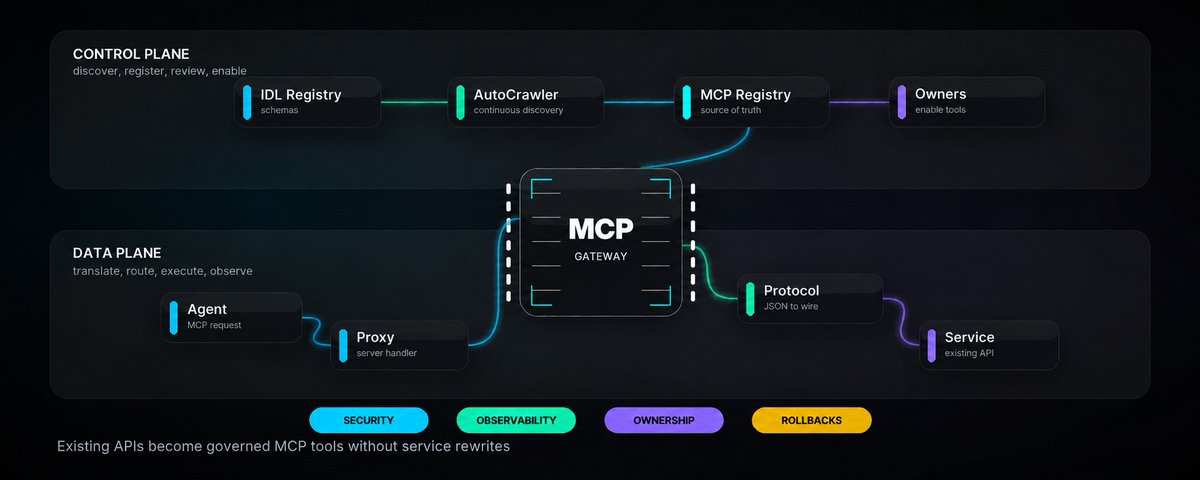
Last month, @UberEng posted about the MCP gateway they built: 800+ MCP servers with over 5000 tools. It's very impressive engineering, but I wanted to add some additional context for other companies considering building a gateway based on what we see at @speakeasydev.
First, going to start with where I'd alter the story for most companies:
- 100% API -> MCP coverage isn't the right success metric. Engineers love coverage because it's measurable, but usefulness is what you want. Start with the most important tools and expand as you learn about how people use agents internally.
- External MCPs are just as important as internal ones. Arguably it's the place to start before moving to internal MCPs
- Relatedly, gateways are not only a tool for engineering. Non-technical users are some of the most prolific users of MCPs within a company. It's important to build for them when you're thinking about a gateway.
Here's what every company can learn from Uber
- MCP discovery matters: Knowing which tools people are connecting to agents is how you understand how AI is actually used at your company. Observability is a pre request for security and one of the best ways to do that is create a golden path of AI use.
- Connection to internal data sources matters: Without it, how can agents really have context on what's happening within your company. These are often the most critical systems that need to stay off the public internet.
- Security is a really useful component of a gateway. A lot of people start using MCP gateways for enablement, but an MCP gateway is the perfect place to enforce access controls on agents.
- MCP gateways need to be identity aware so that every call is attributed to a human identity sourced from your idp, an agent identity or a delegated identity.
If anyone wants an MCP gateway without the internal build, we would love to get you set up. It only takes a couple of hours for a company wide rollout.
www.nitter.gq/UberEng/status/2106071…
Speakeasy retweeted
We’ve been here before.
In the early days of the cloud, it was normal for every engineer to be an admin. Critical credentials sat in shared config files and services had needlessly wide permissions. It took the industry a decade to get proper IAM practices in place.
Agents are at that same moment right now. They run on borrowed credentials, with access far wider than their tasks require, and there's no audit trail recording what happened
The difference is that this time we know better. We should have identity per workload. Least privileges should be applied. We should maintain a clear record of every action.
We don’t need to relearn these things the hard way.
That’s why we’re building agent identity at @speakeasydev. We want to help companies to say yes to agents by mitigating the most dangerous agent outcomes.
It’s time to bring a dose of common sense into the conversation about using agents.
You wouldn’t give a new hire admin access to production on their first day. You wouldn’t let them share someone else’s login. You definitely wouldn’t let them migrate your customer DB without someone signing off on the work.
Yet that’s how many agents are being deployed right now. They borrow a human’s credentials, inherit every permission that person has, and run without anyone watching.
Agents don't need a new philosophy. It needs the same rules we already apply to people:
- Every agent gets its own persistent identity
- Access is scoped to the job it’s doing
- Anything that can't easily be undone needs a human to approve
- Everything it does is on the record
Agents are brilliant at doing the tedious work nobody wants to handle. They just need the same guardrails as everyone else.
Can't identify your agents? We can.
We've got everything you need to start running agents safely in prod:
→ Agent identities: every agent gets its own named principal instead of a borrowed key
→ Keyless auth for agents: agents in GKE log in with workload identity, so there are no API keys to leak or rotate
→ Central credentials: server tokens are set up once in Speakeasy, and agents never see them
→ Per-agent permissions: choose which MCP servers and tools each agent can use
→ Delegation guardrails: an agent can only get a subset of the permissions of the person who created it
→ Audit trail: every tool call is logged to the agent that made it

Speakeasy retweeted
Tool calls on @speakeasydev are up 300% since August.
The number of people using agents went up. But that isn't what's driving it.
What changed is how much each agent does on its own. A few months ago, most agent sessions looked like a person asking a question and getting an answer. Now they look like an agent picking up a task, pulling context from five systems, writing code, checking it and moving on to the next one. No human in between each step.
Every one of those steps is a tool call. As agents get more autonomous, the calls compound.
This is the shift enterprises need to plan for. The question is no longer "which AI tools do our people use?" It's "what are our agents doing, across which systems, and who approved it?"
That's the problem we're building Speakeasy to solve: one control plane to connect, control, secure and observe every agent's access to your tools and data.
The curve is only getting steeper.
