

The deterministic document platform for agents and humans. SDKs, cloud APIs, integrations, and workflow automation turn documents into reliable workflows.
We’re global!
Joined August 2012
- Tweets5.3K
- Following180
- Followers4.3K
- Likes1.2K


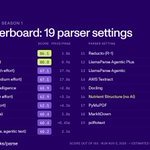


The details matter in document parsing. This WholeDoc Bench case takes a closer look at edge cases which make most parsers fail.
We put our parser head to head with frontier models, and the results were clear: Nutrient ourperformed frontier models by a significant margin.
Review the benchmark: bit.ly/4kZ4KWE
1
112
What is a decision model? Learn in under 60 seconds.
We sat down with AI Engineer Austin Nguyen to discuss what decision models are, and how they're used.
Learn more about the Nutrient decision model: bit.ly/4jpIZyF
What happens when a table runs across multiple pages?
Most parsers will break. Multi page documents are not something you can reliably extract with most tools, and that's a problem.
But not for us. We tested a bank statement with 222 transactions, and reliably extracted the correct information every time.
See the example: bit.ly/4C26nsW
161
How can you search through thousands of documents? Try to give it to an agent and you'll overwhelm the context.
We discuss NuDocs, an AI-native document editing suite build specifically to solve problems like this.
2
183
Paper forms → digital workflows.
First City Monument Bank streamlined approvals with Nutrient Workflow, reducing form errors and improving visibility.
Their advice? Start with one key process and build from there.
Full story: bit.ly/4zJBQ1k
135
Nutrient retweeted

We built a parsing benchmark WholeDoc Bench around where documents actually break: tables that run across pages, paragraphs split by a page break, scans with typos that have to stay typos.
Nutrient is #1 overall. The best frontier model scores 67.1 at 10x our price per page.
Only 2 of 19 parser settings get both page-break cases right. Both are ours.
Code is Apache 2.0. Think your parser belongs higher? Open a PR.

Today we're releasing WholeDoc Bench, a benchmark that scores document parsers on whole documents, not just individual pages.
Nutrient topped the leaderboard at just a tenth of the price compared to frontier models:
• Nutrient Agentic: 86.1/100 at 1.8¢ per page
• Best frontier model: 67.1/100 at about 18¢ per page
Here’s how it works 🧵

We built an AI sales agent, and now we're sharing the playbook. 🚀
Our CRO Richard Malloy and Director of PMM Greg Ives joined SalesforceBen to walk through the build and share 4 rules for bringing AI into your own org.
Watch on demand:bit.ly/sfben-webinar

1
1
181
Today we're releasing WholeDoc Bench, a benchmark that scores document parsers on whole documents, not just individual pages.
Nutrient topped the leaderboard at just a tenth of the price compared to frontier models:
• Nutrient Agentic: 86.1/100 at 1.8¢ per page
• Best frontier model: 67.1/100 at about 18¢ per page
Here’s how it works 🧵
What we found: tables that continue onto the next page break most parsers. Fewer than 1 in 5 kept them in one piece.
Even higher reasoning levels were not an effective solution. We ran tests with multiple reasoning levels, which moved scores less than half a point.
1
1
114
Want to test it yourself? Run the benchmark on our sample, or try our API on your own documents.
Results: nutrient.io/benchmarks/parse
Code and paper: github.com/PSPDFKit-labs/who…
Try it: dashboard.nutrient.io/sign_u…
Have another parser you’d like us to test? Let us know in the comments! We’ll be happy to try it out.

90
Fast answers, straight from the document. Watch the mailroom cat make a decision with Nutrient Data Extraction.
441
Most questions you ask about a document have a short answer.
Is this an invoice or a contract? Is this extracted value actually on the page? Where does one invoice end and the next begin?
Yet the usual approach is to send the whole file to a general-purpose LLM and wait while it writes a reply, one token at a time.
So we built something different: the Nutrient document decision model.
It reads a document, both the page image and the text, and returns a choice plus a calibrated confidence score. No generated paragraphs, no waiting.
What that gets you:
→ About 200 ms per answer
→ Scores calibrated to how often the model is actually right
→ Visual understanding that text-only approaches miss
It’s already live in Nutrient DWS, powering our classify and split endpoints and checking extraction results against the source document.
Nutrient AI engineer, Austin Nguyen, explains why we built it, how we trained it, and where it falls short:
bit.ly/4jpIZyF
Try the demo on Hugging Face:
bit.ly/4i8tEjE
Story time: we gave our extraction a four-page California small claims form, and it came back with the currency as "USD," even though those three letters appear nowhere in the document.
The form is a real court form filled in with test data, and we'd asked for six things:
- The plaintiff
- The defendant
- Amount claimed
- Currency
- Date of the incident
- Reason for the claim
Five of them were right there on the page. The currency wasn't, but our setup mentioned that US court forms always use dollars, so the model did the sensible thing and filled in USD.
It wasn't really wrong, but it was a guess rather than something read off the form, and in the extracted data it looked exactly like the five values that were. If you're automating claims, contracts or court filings, that's the kind of answer that slips through until someone has to explain where it came from.
We caught it because every value comes back with a citation showing the page it came from and the exact spot on that page. The currency pointed to a different page from the amount it belonged to and scored noticeably lower, so a review step would send that one field to a person and let everything else through.
And that's really what we want from AI on such documents. It doesn't have to be perfect, but it does need to alert a human when it is not exceptionally confident in a result. Remember, you are responsible for every document you submit - whether AI assisted or not, so you better be sure that it is correct.
Don't play AI roulette.
See the full walkthrough: bit.ly/4zwT8OJ

1
349
A picture of a signature on a PDF doesn't tell anyone whether the contract changed after it was signed.
A digital signature does, because any later change to the signed content shows up when the file is checked.
How to add one with Nutrient API:
bit.ly/4s1GowY

325